
See the margin as it happens
Actual costs and estimate at completion (EAC), job by job. When the estimate goes over budget, Quadra flags it before the job starts losing money.
actual costsestimate at completionbudget
Know what you are earning on every job now, not after final acceptance. Quadra is the ERP for companies that design, build, commission and service special machines: every hour, every order and every euro stays tied to its job.
From 1 January 2027 · 30 days free on your own data · no card · Look inside the app →
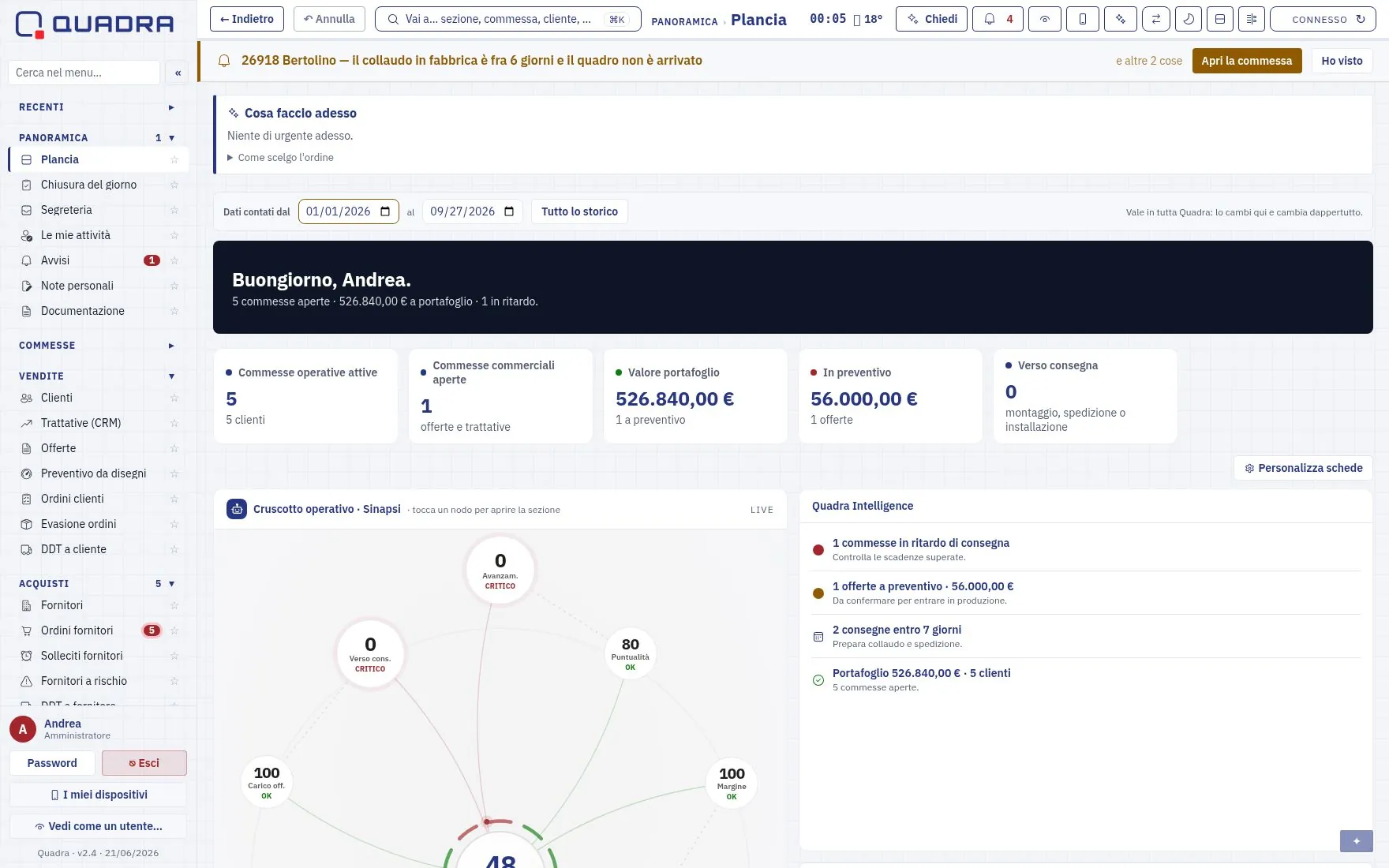
26918 Bertolino Impianti
Factory acceptance test in 6 days: the electrical cabinet has not arrived yet.
working screens in 14 areas
tabs inside every job
working screens on the phone
license fee per user
Data is entered once and travels with the job. The quote becomes an order, the order becomes a bill of materials and purchases, testing closes the non-conformities, and delivery opens the machine portal.
CRM with weighted pipeline and win probability
Calculator with component catalog and margin
Gantt, workloads, BOM from CAD, orders
FAT/SAT; failed checks open non-conformities
Signed checklist, delivery note, invoice, CE technical file
Machine portal with QR, service calls, spare parts
Upload the Excel or CSV file of your jobs, just as you keep it today: job number, customer, due date, value, costs, hours, progress — even only some of the columns. We'll tell you straight away which jobs are late, which are at risk and where your margin is slipping, with the three things to do first.
Your file is not stored: Quadra reads it to run the analysis and then discards it. Only the result is kept, for 30 minutes, to prepare your PDF. The comment is written by an artificial intelligence from your numbers. Privacy.
Missed due dates, jobs due soon with progress behind, hours and costs over estimate.
From costs to date and progress: what you will really earn when the job is finished.
In order, with the job number. We'll send you the full PDF in exchange for your email.
Quadra is in a testing phase and we are refining it over these months. From 1 January 2027, companies that sign up try it free for 30 days on their own jobs: costs to date, estimate at completion, margin job by job, quotes and management control. Leave your name, company and email: we will get back to you before the start.
Two lines in the form alongside. No commitment.
To understand your company and choose together which jobs to start from.
Customers, suppliers and open jobs, from Excel or from your current system too.
Office and phone, on your own jobs. At the end, you decide whether to continue.
Actual costs and estimate at completion (EAC), job by job. When the estimate goes over budget, Quadra flags it before the job starts losing money.
Declaration in the new format, digital manual online for at least 10 years, safety software retained. Already in Quadra.
Every delivered machine has a portal with a QR code: manual, declaration of conformity, service and spare parts. Every request opens a task in Quadra.
Jobs, KPIs and deadlines exposed read-only to external AI agents, with a revocable token.
SdI and open banking, compliant digital archiving, RENTRI, ECB rates in 31 currencies, VoIP phone system, cameras, digital signature.
A commercial ERP sells its copilot for €2,100 per user per year. In Quadra the agents are part of the work. They suggest, and a person confirms: nothing saves itself.
Two. Job 26909 has an expected margin of 4.1%: the estimate at completion is €6,200 over budget. Job 26921 is at 9.8%, with assembly hours 18% over plan.
Example with demo dataAn ERP is only as good as the trust in its numbers. In Quadra every key figure has a single rule, explains itself and checks itself every night.
Next to the main tiles a "?" opens the rule written in plain language and the list of documents that make up that number. If something doesn't match the common rule, it says so.
At night Quadra compares the same numbers across pages and against the bank. In the morning, on the Today page, you find what doesn't add up and why.
Backlog, delays, receivables, cash: every key number is computed by a single rule and shows the same value on every page.
Whoever runs the administration finds the money on top: to collect, overdue, to pay, cash and backlog, each with its own "?".
Revenue, costs and margins without VAT; open receivables and payables with VAT, and the taxable amount written next to them.
2026, 2025, 2024 or all: you choose once. Quadra warns you when you are looking at years from the previous system, and the start date of the accounts is a company setting.
And the job board is cleaner: five indicators (in progress, late, due within 14 days, on hold, to invoice), one row of filters and a clear label for every tab.
Accept that quote, move a delivery, hire someone: Quadra shows you the effect before it happens, starting from the company's real numbers.
It starts from invoices to collect and to pay, jobs to invoice and fixed costs. Try the levers and see at once the lowest point of cash and the hours beyond workshop capacity. It saves nothing: experiment freely.
While you price a quote, Quadra compares estimated hours and materials with the real ones of finished jobs of the same type, and tells you where estimates usually miss. It speaks up once it has enough cases.
Ctrl+K, or the "Go to…" button: "new quote Rossi" opens the quote with the customer already chosen, "simulate" opens the simulator, "why receivables" explains that number. A question ending with a question mark goes to "Ask Quadra".
As always, each one came from a need of the company where Quadra is used every day, and each one is already in use.
The 13-week cash forecast run a thousand times, using each customer's real payment delays. Not a single curve: the good case, the likely case and the bad case, and how close you get to zero. Treasury is now an area of its own, with accounts and banks on the same screen.
On the job card, in plain words: where costs, margin and the end date will land at today's pace, from earned value and real progress. If the budget or progress is missing, Quadra doesn't make it up: it tells you what it needs to make the forecast.
Month-end checks on one page: «September, 6 of 8 fine, 2 to look at». Invoices to issue, VAT, uninvoiced orders, numbers that don't add up. Every check says what it is based on and takes you to the screen where you fix it. It never writes anything on its own.
What your people cost year to date and at year end, by department; employment deadlines; the incentives worth asking your payroll advisor about. Hiring is guided step by step, and the calculator goes from gross salary to take-home pay and back. Every employee sees their own situation and their payslip explained.
Upload the drawing PDFs, and the bill of materials if you have one: the AI reads each drawing and Quadra estimates material and machining. Every number says where it comes from. When you enter the real costs, the next estimate takes them into account.
Several identical machines on the same job: each unit has its own serial number, tests and warranty, its declaration and CE plate per serial number, and its own milestones in the payment plan.
A chat with Claude inside Quadra, for the people who run the company: it opens from the "Ask Claude" button in the top bar. Talk freely, even about things that have nothing to do with Quadra: thinking something through, advice, an email, a text. When the company's numbers are needed, Claude reads them from Quadra, says where they come from and takes you to the screen with the "Open" button.
45 working screens on the phone, the same app for the whole company. Designed for people who work in gloves, under a machine or on a customer site.
You are on site · 38 m from the entrance
Via dell'Industria 12, Turin
You can only clock in within the site radius. The check runs on the server: outside the radius, or with location denied, the clock-in does not go through. People travelling for work choose “Off site”.
At the end of the day, clock-out unlocks only once the hours are assigned to jobs. Labor cost reaches the job the same day.
At the company or on a site with no network, hours wait in a queue on the phone and send themselves when the network is back.
Delivery notes, maintenance reports, certificates: take a photo, and the PDF lands in the right job.
You record the meeting, the AI transcribes it and suggests action items with owner and due date. They become real tasks after you confirm.
Pre-delivery testing under the machine: big OK and KO buttons, signature on the screen. Without a signed checklist the job cannot move to Delivery.
Every order awaiting approval shows what it does to the job margin, before and after. If it pushes the job below the alert threshold, Quadra asks first.
At the end of the day Quadra drafts the report from the team's hours and activities; the customer's manager signs with a finger and gets the PDF by email.
Record the operator training, Quadra transcribes and summarises it, attendees sign with a finger: the record goes into the technical file and onto the machine portal.
Like WhatsApp, but inside the job: @name notifies the person, the history flows into the thread by itself and the AI summarises what you missed.
Quadra spots the trip in the calendar, prepares the customer documents beforehand, and afterwards gives you the expense report already filled in.
Photo of the receipt, amount and job. The daily allowance is calculated automatically, and a meal receipt reduces it by a third. The manager approves from the phone.
The tracker in the vehicle records every trip. Quadra compares it with the calendar appointments, links the kilometers to the task and adds them to the expense report: mileage refund for your own car, business kilometers for the company vehicle. Confirm with one tap.
“How many hours do we have on 26918?” Questions in plain language, spoken too, with answers from real data.
The company video surveillance, on the phone of the person responsible for it.
Installs from the browser: push notifications, the Android Back button, quick approvals of leave, orders and clock-ins.
Put the phone on the table and press a button. When the meeting ends you have the transcript, the summary, the decisions and the action items with owner and due date.
Welding cell progress
Summary. Mechanical assembly at 90%. The late electrical cabinet pushes the factory acceptance test back two days. The customer must be told by Monday.
A GPS tracker in the OBD port, and Quadra receives the position directly, with no external service to pay for per vehicle.
Quadra connects to the company phone system (FreePBX and Asterisk). The phone rings and the customer is already on screen, with their open jobs.
Quadra connects to your banks through open banking: it sees the balances and transactions of every account and initiates transfers. You authorize every payment at your bank, with your own credentials.
Only the customer names have been changed.
The opening screen: order backlog value, active jobs, upcoming deadlines, and a gauge that sums up the company's operational health in one number.
On the left, a few areas instead of a long list of items. Each area opens on the last screen you used, and the tabs at the top take you to the other screens of the same area without going back to the menu. Favourites, Recent and search are still there. Open the area you are interested in.
Where you start in the morning: what happened, what is waiting for an answer, what is due.
All company documents in one place, with deadlines that warn you in advance: safety, operators, sites, vehicles.
The heart of Quadra. Everything (hours, costs, orders, documents, progress) is tied to a job, and you read it from there. Every job has its own chat, like WhatsApp: @name notifies the person, the job history flows into the thread by itself and the AI summarises it. On every job card, buttons with the number of orders, delivery notes, invoices, tasks, minutes, tests and chat messages: one click opens the list.
From first contact to order: customers, quotes, confirmations and deliveries, with documents generated from the data, not from a template you fill in. Quotes learn from finished jobs: while you price, Quadra tells you whether hours and materials usually go beyond the estimate.
Suppliers, orders and receipts. Orders carry the cost to the job: this is where management control gets its numbers. Job requirements planning (MRP) works out from the bill of materials what is missing and what to order; suppliers receive the order through a supplier-portal link and reply there. Supplier invoices match themselves to the order.
What you have, where it is and what it is worth, and the workshop machines with documents and inspections. Including the catalogs of components the company resells, with stocktaking, lots and QR codes on items.
The installed base and maintenance, both ours and our customers'.
Receivables and payables, accounting and month-end close. Invoices come in from SdI and categorize themselves when a rule says so. Including Intrastat lists. Payment reminders to customers start from the real outstanding amount, with deposits and split payment already deducted.
Today's cash and the coming months': account balances, expected collections and payments, and how safe your cash is.
What a job really costs and how much is left. With the estimate at completion, not just actuals. Margin at completion: for every job Quadra estimates where the margin will end up, from the real pace of hours and the budget still to spend, and warns you if it drops. With the "what if…" simulator: cash and workshop load for the next 12 months, trying decisions before you take them.
Your people: attendance, hours, leave, payslips, training, skills. It opens on the people overview: what it costs, what is due, which incentives to ask about.
ISO 9001, safety, environment, privacy and the AI Act. The registers are read from the data, not filled in separately.
What you need around the core: file exchange, translation, editors, integrations.
How Quadra is configured: users, permissions, numbering, templates.
Behind the screens are the things Quadra does on its own: SdI invoices categorized by your rules, bank transactions matched to documents, documents created already filled in, and nightly checks that flag whatever does not add up.
Import from the CAD export with column recognition and revision comparison. With the CATIA V5 macros, the BOM comes out with the model's graphics and goes straight into the job.
Supplier orders from the BOM or from requirements. Reminders for late orders, with emails written by AI, and checks on PDF order confirmations.
Minimum stock and reordering; picks and returns tied to the job with their value; serial number register of safety components for recalls.
Operations updated from the phone, cycle time, and a company TV showing deliveries, attendance and days without injuries.
The project folder is created with the job. Drawings on the network are indexed: search them by code and open them from the BOM, on the phone too.
STEP and STL files open without extra software. Documents stay on the server, where people would look for them: Quadra browses and opens them.
Quadra connects to the network folders your company already uses. It does not copy documents into itself: it reads them where they are, indexes them and opens them, on the phone too.
Tomorrow's rules, handled today.
Declaration of conformity in the new format, digital user manual online with a QR code guaranteed for at least 10 years, retention of safety software, register of complaints and recalls.
Out-of-tolerance calibrations and failed tests open a non-conformity on their own. Corrective action with 5 Whys and effectiveness check; automatic supplier scorecard.
Waste in/out register with digital waste forms (FIR) and compliant archiving. Record of processing activities, privacy notices, export and anonymization of personal data. Sustainability on the EcoVadis framework.
To cover the same scope, a machine builder usually combines a vertical ERP, quality software, an after-sales platform and a paid AI module.
| Area | Typical commercial ERPs | Quadra |
|---|---|---|
| ETO job with live margins and estimate at completion | Dedicated vertical products (Epicor, eSolver, Jgalileo) | Included |
| ISO 9001 quality and Italian safety law 81/08 | Separate software (QualiWare, Blulink) | Included |
| Machine portal and Reg. 2023/1230 | Dedicated platforms (EquipmentCloud) | Included |
| AI agents in the processes | Add-on at €2,100 per user per year | Included |
| Accounting, VAT and labor cost | Included | Included, with tax returns and payslips left to your advisers |
Reference cost of a commercial ETO ERP for an SME: $85,000–650,000 in the first year, plus $50–200 per user per month. Analysis of 22 sources, July 2026.
The menu shows only the areas you have bought, and disabled areas are locked on the server too. Master data, tasks, users, permissions and GDPR are always included.
Jobs, sales and purchasing: the job thread for those getting started.
Start plus warehouse, production, engineering and after-sales service.
Company plus administration and finance, management control and quality.
Permissions by user and role, full change log, recycle bin with restore, passwords with strong hashing, and regular security audits.
Nightly backup of database and files, with an encrypted off-site copy. A slow network drive does not stop the system. Updates from the admin panel, without a terminal.
Palette in your brand colors, a Ctrl+K command bar that searches and acts, adjustable density, dashboards everyone can reorder or hide.
Build what sets you apart, delegate the rest. Tax accounting and payroll stay with the professionals. Everything that makes a company different from its competitors lives in Quadra.
Quadra grew up inside a company that designs and builds robotic welding cells. Every module came from a need of the day: in the office, in the company, on site at a customer.
These are its numbers, calculated by Quadra.
Data as of 10 October 2026Quadra has no development team. It is written by Andrea, who uses it every day in the company where it was born, working with Claude Code: several sessions in parallel, each with its own job. A person makes the decisions, the AI writes the code.
Every decision stays written down, in the code and in the working notes: why something is done this way, what must not be redone, which mistake not to repeat. Whoever comes next, person or AI, starts from there.
Before every update the automated checks run: the code, the calculation rules and the screens tested in a real browser. Nothing goes live without a person's go-ahead.
Every number is calculated in one place and every screen reads it from there: hours, holidays, margins. If two pages said two different things, it would be a bug to fix, not a matter of opinion.
Inside Quadra, Claude reads invoices and documents, answers questions on the data with the source, estimates quotes from drawings. It saves nothing on its own: every proposal waits for a confirmation.
Quadra exposes its data through the Model Context Protocol, the open standard for connecting an AI to a company's data, through a dedicated, controlled access.
The code and the rules are written down and version-controlled; Simone, the systems engineer, knows the servers and installations. Your data stays yours: backed up every night, and every table can be exported to Excel.
He designed Quadra around the work of his own company and decides every feature, one by one.
Installation, servers, networks and security. He is the one who connects Quadra to the servers and folders your company already uses.
Short answers to the questions we are asked most often.
Quadra is a project-based (engineer-to-order) ERP for Italian companies that design, build, commission and service special machines. Every hour, order and euro stays attached to its job, and the margin is visible while the work is in progress.
Small and mid-sized job shops: builders of robotic cells, automation lines, special machines and custom tooling. Quadra was born in, and is used every day by, a company that builds robotic welding cells.
It adds up costs to date (hours, purchase orders and supplier invoices) and computes the estimate at completion (EAC) from the real pace of hours and the remaining budget. When the estimate exceeds the budget it warns you before the job turns into a loss. Every key number has a «Why?» showing its rule and source documents.
Yes. Declaration of conformity in the new format, a digital manual online for at least 10 years, and a machine portal with a QR code for the customer. There is also a free 20-question checklist: quadra.works/regolamento-macchine-2023-1230
AI agents propose and a person confirms: nothing is saved on its own. They read e-invoices and match them to purchase orders, import customer orders from PDFs and write minutes from recorded meetings. Money fields are removed before the model sees them. External agents can use a read-only MCP server.
Yes, as a web app (PWA): GPS clock-in, hours on jobs, expense claims, checklists signed with a finger, order approvals. It also works offline.
Yes: Italian e-invoicing (SdI), open banking, legal archiving, RENTRI waste register, VoIP switchboard, digital signature. Customers, suppliers and jobs can be loaded from Excel or from your current system, and files stay on your server.
Pricing is being defined: a monthly fee for the whole company by tier (Start up to 10 users, Business up to 20, Complete up to 30); phone-only users are unlimited and included. Onboarding is quoted. Details: quadra.works/prezzi
The trial starts on 1 January 2027: registered companies use Quadra free for 30 days on their own jobs, no credit card. Sign up: quadra.works/prova-quadra. Before then you can ask for a demo at [email protected].
The assistant answers right away from the content of this site. For anything else, we'll get back to you.
Quadra is in a testing phase: from 1 January 2027, companies that sign up try it free for 30 days on their own data (sign up). Want to see Quadra first, or have questions about pricing or a special case in your company? Write to us: we reply by email and, if useful, set up a demo.
Or write to [email protected] · [email protected]